
Create a TradingView alert and understand commands
Create an alert in TradingView
- Open your chart in TradingView
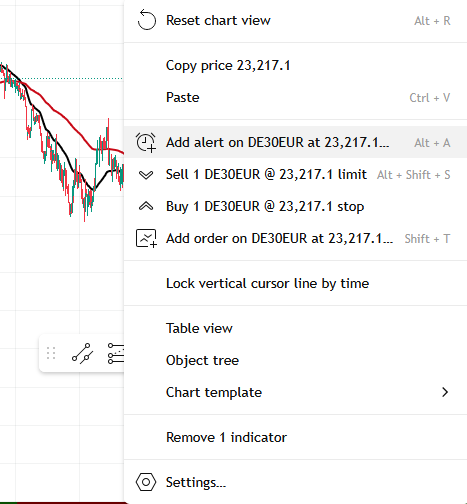
- Right-click on the chart
- Click Add alert
- Fill in the trigger condition
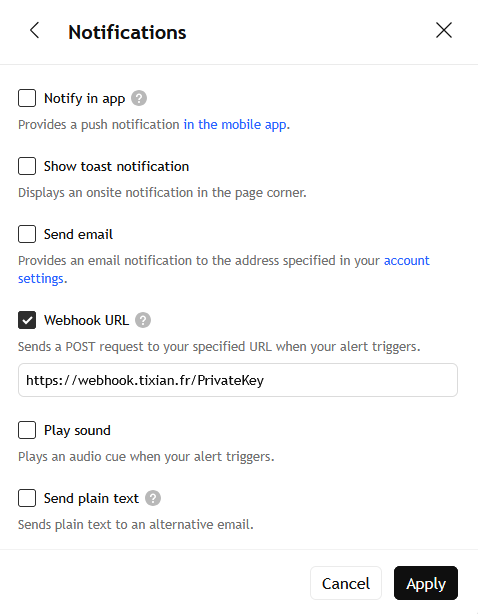
- In the Notifications section, check Webhook URL
- Paste the webhook URL
- In the Message field, paste your JSON
- Click Create
Enter the webhook URL
Example TIXIAN webhook URL to display and keep copyable:
https://webhook.tixian.fr/YOUR_UNIQUE_TOKEN
Depending on your setup, two cases may exist:
- a personal URL that already contains your token
- a configuration where you must also send the privateKey in the JSON
If support gave you a personal URL, use it as it is. If your setup relies on JSON authentication, also add the privateKey to the message.
Fields to use in your alerts
- privateKey: the account private key if your setup requires it
- symbol: the symbol, for example
EURUSD - side: the order type, for example buy or sell
- price: the entry price for pending orders
- risk: the risk value sent to the robot
- sl: the stop loss
- tp: the take profit
Market order example
{
"privateKey": "YOUR_PRIVATEKEY",
"symbol": "{{ticker}}",
"side": "buy",
"risk": 1,
"sl": 20,
"tp": 40
}
Pending order example
{
"privateKey": "YOUR_PRIVATEKEY",
"symbol": "{{ticker}}",
"side": "buylimit",
"price": 1.08250,
"risk": 1,
"sl": 20,
"tp": 40
}
In the current MT5 robot code, the field used for the entry price of a pending order is price. If you use entry, the order may not be interpreted as expected.
Close example
{
"privateKey": "YOUR_PRIVATEKEY",
"symbol": "{{ticker}}",
"side": "closelong"
}
***PHOTO ICI*** + Screenshot of the Message field with a correctly filled JSON payload.
What each field is used for
- privateKey: identifies your account if your webhook URL does not already include the necessary token
- symbol: indicates the symbol to process
- side: indicates the action to perform
- price: indicates the entry price for a pending order
- risk: indicates the risk value to use
- sl: indicates the stop loss
- tp: indicates the take profit
Main commands
Market orders
- buy or long
- sell or short
Pending orders
- buylimit
- buystop
- selllimit
- sellstop
Close and cancel actions
- closelong
- closeshort
- closelongshort
- cancellong
- cancelshort
Important rules
If you use RiskSource = RISK_FROM_TV_PERCENT
- the risk field becomes mandatory
- use a value strictly greater than
0 - keep the value reasonable
- avoid sending a value greater than
50
If you use PriceMode = PRICE_ABSOLUTE
- for a buy, sl must be below and tp above
- for a sell, sl must be above and tp below
For pending orders
- buylimit: price must be below market
- buystop: price must be above market
- selllimit: price must be above market
- sellstop: price must be below market
Testing advice
- use a demo account
- test one symbol first
- keep risk low
- then check Orders, then Transactions