
MT5 Robot Settings
Settings overview
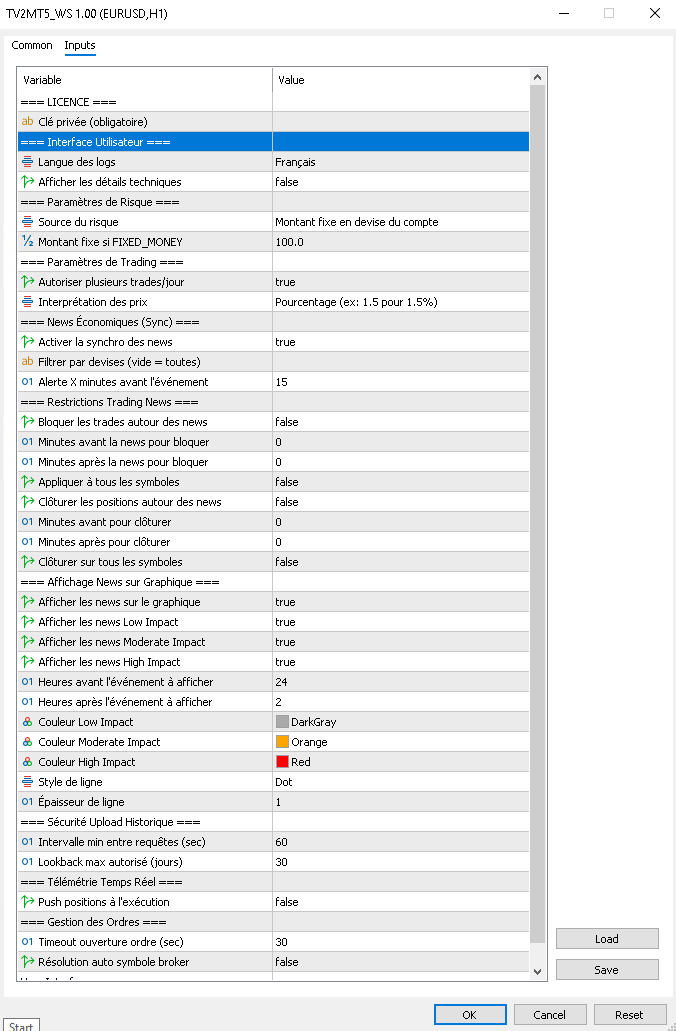
This page explains the settings visible in the MT5 robot based on the current project code. The names below match the real robot settings.
Essential settings
PrivateKey
The setting PrivateKey corresponds to your private key. It is the most important robot setting.
Without this value, the robot cannot authenticate or correctly receive signals.
Language
The setting Language controls the language used for robot messages and logs.
Beginner recommendation: use LANG_ENGLISH if you work in English.
VerboseLog
The setting VerboseLog controls whether detailed robot logs are displayed.
- true: detailed logs are displayed
- false: fewer logs are displayed
Beginner recommendation: keep true during your first tests. If you no longer want detailed logs later, you can switch it to false.
Risk settings
RiskSource
The setting RiskSource defines where the risk used for position sizing comes from.
- RISK_FROM_TV_PERCENT: the robot reads the risk field sent by TradingView
- RISK_FROM_FIXED_MONEY: the robot ignores TradingView risk and uses a fixed amount instead
Beginner recommendation: start with RISK_FROM_TV_PERCENT if you want to manage risk directly from your alerts.
RiskMonay
The setting RiskMonay is used only if RiskSource = RISK_FROM_FIXED_MONEY.
Example: 10.0 means the robot tries to risk about 10 units of the account currency per trade.
Trading settings
AllowMoreThanOneTrade
This setting defines whether the robot can accept several trades during the same trading day.
- true: several trades can be accepted
- false: a second signal may be rejected
PriceMode
The setting PriceMode defines how stop loss (SL), take profit (TP), and price (price) are interpreted in your alerts.
- PRICE_PIPS: values represent distances, for example
20pips - PRICE_ABSOLUTE: values represent exact prices, for example
1.08450 - PRICE_PERCENTAGE: values represent percentages
Beginner recommendation: use PRICE_PIPS if you think in distance, or PRICE_ABSOLUTE if you already know your exact price levels.
AutoResolveBrokerSymbol
The setting AutoResolveBrokerSymbol tries to automatically find the exact broker symbol when the received symbol is not an exact match.
This setting is complementary to symbol mapping in Account management. Mapping gives you an explicit correspondence. AutoResolveBrokerSymbol acts more like an automatic fallback on the robot side.
Economic news settings
EnableEconomicNewsSync
Enables economic calendar synchronization.
NewsFilterCurrencies
Lets you filter announcements by currency only, for example USD,EUR. Leave it empty to include all currencies.
NewsAlertMinutesBefore
Defines how many minutes before an announcement the robot should display an informational alert.
NewsAvoidTrading
Blocks the opening of new trades around economic announcements.
NewsAvoidMinutesBefore
Defines how many minutes before the announcement opening trades should be blocked.
NewsAvoidMinutesAfter
Defines how many minutes after the announcement opening trades should remain blocked.
NewsAvoidAllSymbols
If enabled, the block applies to all symbols, not only the instruments directly related to the announcement currency.
NewsAutoCloseTrades
Lets the robot automatically close positions around announcements according to the windows defined below.
NewsCloseMinutesBefore
Defines how many minutes before the announcement positions can be closed automatically.
NewsCloseMinutesAfter
Defines how many minutes after the announcement automatic closing can still apply.
NewsCloseAllSymbols
If enabled, automatic closing applies to all symbols.
NewsShowOnChart
Displays economic announcements directly on the chart.
Beginner recommendation: keep EnableEconomicNewsSync = true, NewsAvoidTrading = false, NewsAutoCloseTrades = false, and NewsShowOnChart = true for a simple start.
Advanced settings to keep at default
HistoryRequestMinIntervalSec
Defines the minimum interval between two history requests. This avoids sending too many requests too quickly.
HistoryRequestMaxLookbackDays
Defines the maximum number of days to look back when requesting history.
PUSH_OPEN_ON_EXECUTE
Controls sending information about open positions at execution time. This is a more technical setting that should stay as is when starting.
OrderOpenTimeoutSec
Defines the maximum waiting time for an order opening before the operation is considered timed out.
Practical advice: if you are unsure which mode to choose, start with RiskSource = RISK_FROM_TV_PERCENT, use PriceMode = PRICE_PIPS or PRICE_ABSOLUTE, and keep VerboseLog = true during your first tests.